SL3 BruteForce Cloud System
 is a new addition to Martech Service Manager. The application definitely makes it easy to support multiple computers that count the codes for SL3 phonesusing Brute Force method.The application is based on oclHashcat-lite v0.06 ,v0.08 and v0.09. The main part of the application is server, dividing tasks between computers on which SL3Client application is running.
How does it work?On Super PC, which is used to count and has the appropriate graphics card, install SL3Client which communicates with the server every few seconds. Serwer is executing all the work with dividing and checking whether the code is counted. We manage the whole process through the site
http://servmg.com/:
- adding logs
- import from .sha/.log/.fnx/.bcl files
- setting the queue
- grabbing the results
- adding new PCs
- monitoring PCs states
- notification by mail
- calculation result sending via e-mail
- support for PayPal payments
- fully editable individual site (text/colors/images/logo)
- GPU watchdog setting for each drone
- autoupdating
- full support via API
- clients accounts
- web for clients to check time left: http://servmg.com/en/hcloud/mycode/
The system can connect up to 1,000 computers. Work on the calculation of one code is divided into 100 or 200 or 500 or 1000 pieces. So small parts are sent to each PC, when one PC calculates its part tells the server about the result, if the code is not found, it retrieves the next part of the counting. If, however, the Pc found the code - the server immediately stops counting on the other PCs and sends them the next parts of another hash.
How do I start?
- Download SL3Client nstalator
- Just intall it
- Logo on http://servmg.com/pl/hcloud/, You have to accept the rules of application - there must be file: EULA.accepted in the folder
- Run SL3Client - it will generate HW Key (the unique number for every PC)
- On the site click Drone add URL, paste HW Key, add descripton of PC (for example: PC in a green housing) and select the system and type of cards you have in this PC
- There (on the site) will be generated a KEY to paste into SL3Client
- It's better to select autostart option(eg after a power failure the program automatically starts up and begins to count)
- Immediately after starting SL3Client will connect to the server and check if there is some hash in the queue
- To stop counting on your PC you should close the application
Watch on YouTube...
The biggest advantages of our application are:
- It does not matter how many Super PCs you have
- It does not matter how "strong" Super PCs are
- You can always add more Super PC (even during the counting of some hash)
- You do not need another computer that works as a server
- The fastest algorithm v0.08
- It does not matter the location of PCs - they can be even on other continents;)
- You do not need to have a constant external ip, or run VPNs
- x32/x64 and ATi/nVidia Cards support
- App for Android and iOS to monitoring system and PC's
- Linux version client - beta
- NCK 1-7 result after calc, COD file too.
F.A.Q.
What if the PC took the job to count, but is, for example, suspended?
The server periodically checks to see if the task (that was sent) is still counted. Jf the job has been sent to a PC and no response came, then this task will be sent to another free PC.
Can 2 PCs get the same task?
Each task (part of the hash) is sent to only one PC. An exception is when the job was sent but there is no communication with Pc for a long time, then the task is sent to another PC.
What is the difference between the division into 100/200/500/1000 parts?
When we have strong PC (~ 8000MH) we select 100, we will lose less time when sending new tasks. The times are about 1.5 seconds to reload task. The advantage of sharing a larger amount of parts is that the progress on the site is frequently updated.
When the progress on the site is updated?
Progress is updated only when the PC calculates the whole job he got, then sends info that there is or there isn't a code in this peace. It may happen that for some time the progress is stoped and then suddenly jump significantly. It can happen when several PCs ended the task and sent info to the server.
In what format the result is given?
When the counting is completed, there is a .COD file for download on the site. This file can be conwerted to NCK in a few seconds using any box (MX-Key/Cyclone/ATF/FenixKey).
Do I need internet connection on Super Pc?
Yes, stable internet connection is necessary. It can be slow but stable.
Can I have one cloud of Super PC from different locations?
Yes. It does not matter where the PC is connected to the cloud! They may even be on different continents, it's important just to have access to the Internet.
How to move logs in the queue?
Just click on the ID of the hash, hold down and drag anywhere in the queue.
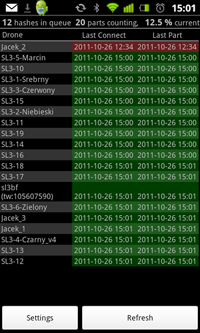
Screenshots:


Download
Windows Client Software:
MSM SL3 Client 3.0 Instalator
Linux Client Software
MSM_client_version: 1.0.6 - 32bit
MSM_client_version: 1.0.6 - 64bit
Dowload:
oclHashcat-lite v0.08
oclHashcat-lite v0.09
oclHashcat-lite v0.10
oclHashcat-lite v0.13
Drivers:
MSM SL3 Status for Android:
https://play.google.com/store/apps/details?id=com.romkenet.msm.sl3status
MSM SL3 Status for iPhone:
https://itunes.apple.com/pl/app/msm-sl3-cloud-status/id586524993?mt=8

PRICE:
At the moment, addition is free for all users of MSM.
* - update available in a few days
BIG Thanks for mr. atom !
Updates:
30.01.2013
10.01.2013
Fully automatic system for selling your power. Just add a link to the msm in the classifieds (or make redirect to your own domain). Client will be able to see all about your offer, can buy credit himself and add hash to your cloud. All you have to do is look how much money do you have 
- You can create your own site for selling credits in MSM
- Fully editable individual site (text/colors/images/logo)
- Paypal payment supported
- Online credit selling
- You can use variables: {{ time_queue }} - estimated end time of current queue, {{ time_yours }} - estimated end time of next hash added
Read more about this update...
23.12.2012
19.12.2012
- MSM SL3 Cloud Monitor for iPhone, this addition is of course free.
- iPhone app to monitoring system and PC's and show how much logs is in queue, curent progres and time to finish last log.
Read more about this update...
08.08.2012
- New method NCK calc - now NCK will show direct after COD found.
No more waiting for NCK codes 
23.07.2012
28.02.2012
- New Client 3.0
- Installer version, included OCL 0.09, you can also download 0.08 version
- Auto update Client, this is the last time you have to update the client manually
- Auto update OCL version on all PC’s
- Card drivers auto update will be ready soon
- New option in Drone edit
- A faster way to reload jobs
- Fixed litle bugs
21.02.2012
- Creating account for customers
Now you can create accounts for your clients with sufficient amount of credits which allow them to add hashes to the queue – you will save time
- End customer can add hashes to count
- Checking the waiting time for calculation of a specific IMEI / hash
Now the client can check the expected time of his code calculation.
Martech Service Manager
The time is approximate and statistically calculated based on the time of recently completed hashes and % of the current.
- Changed the field where you enter the email address (email to which the calculation result should be sent)
How does it look In practice?
1. You create an account for your customer with the specified limit of logs which he can add
2. Tools >> User Manager >> +
3. Customer has access to a simplified version of MSM where he can add/remove
IMEI/hash
4. The hash will be calculated when it turn comes
FAQ:
- The customer can remove mistakenly addend hash and the credit will be refunded automatically, this applies only to hashes whose calculation does not start. If you remove already counted hash your credit will not be refunded.
- The customer sees only his hashes
- The customer can not change the order in the queue
- The cloud admin can change the order of hashes added by the customer
- The admin sees (on the waiting list) the description added by customer and info which user added this
- You can create 3 kinds of MSM access accounts:
- Customer will only see hashes he added
- Manager can see all hashes and can reorder/remove them
- Administrator can manage all SL3 Cloud options
- The customer sees how many credit he have left
03.02.2012
- New Client for Linux 1.0.6
- Now show calc speed
- Few little bugs fixed
16.01.2012
- Add calc method 0 - 100 %
- Add calc method 100 - 0 %
- Add calc method Random - this has been used so far
Now you can decide which method of counting is better for you, individually for each HASH.
11.01.2012
14.12.2011
- New Client version: 2.2.0.150
- Works with Catalist 11.12 and SDK 2.6
28.11.2011
- Full support ocl v0.08
- New version SL3 Client: 2.1.21.147
24.11.2011
- New version SL3 Client: 2.0.21.139
- Add GPU Watchdog setting for each drone. Default is off (Watchdog=0).
- Mniejsze zużycie CPU - teraz działa poprawnie na jednordzeniowym procesorze.
- Poprawiona prędkość, teraz działa szybciej.
- Dodano automatyczne wysyłanie NCK po zakończeniu. Wiadomość e-mail wysyłana w jednym z 14 jezyków.
- Dodano możliwość edycji dronów
16.11.2011
- Added AUTO NCK Calc - after BF finish you will se COD file and after 1 min ALL 7 NCK codes rady to enter
- Add second COD file format - for MX Users
- In client software introduced few small fix (ver.1.3.17.128)
31.10.2011
- Add import from file (Known formats: .log .sha .fnx .bcl)
- Add timers, when will be done next add phone (Average speed from last 10 phones / phones in queue - current progress) You can easily add this info to your own web using <iframe>.
- New version Android app, is show how much logs is in queue, curent progres and time to finish last log.

 SL3 BruteForce Cloud System is a new addition to Martech Service Manager. The application definitely makes it easy to support multiple computers that count the codes for SL3 phonesusing Brute Force method.The application is based on oclHashcat-lite v0.06 ,v0.08 and v0.09. The main part of the application is server, dividing tasks between computers on which SL3Client application is running.